
Create a PAT with a proxy user
To connect the application with Altru, create a proxy user in Altru using a Personal Access Token (PAT). This ensures data security and avoids the risk of data breaches.
Step 1: Access Altru application users
- Log in to Altru.
- Click on "Administration".
- Click on "Application users".
- Click on "Add proxy user".
Step 2: Create a proxy user
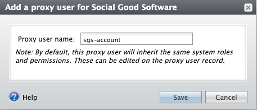
- Enter "sgs-account" in the "Proxy user name" field.
- Click on "Save".
- Search for and click on the name "sgs-account".
- Remove system roles not required.
Step 3: Assign roles
Assign the following roles to the account:
- Attribute Categories: This is a system role that defines and stores special information about a wide variety of record types. Required for Checkouts.
- Code Tables: This is a system role that allows viewing and editing entries in code tables. Required for Email Designer.
- Development Data Entry: This role provides read and write access for constituents and memberships. Required for Checkouts, Data Bridge, Digital Membership Cards, and Member Portal.
- Group Sales Coordinator: This role attaches notes for group sales. Required for Email Designer and Link2Pay.
- Blackbaud Built-In AppFX System User Role: This role is for Link2Pay. Required for Link2Pay.
- Guest Services Manager: This role provides lookup details for a ticket and unscans the ticket with the Ticket Scanner.
- Marketing Manager: This is a system role that runs queries on behalf of the organization. Required for Checkouts, Email Campaigns, Ticket Scanner, Member Portal, and Data Bridge.
- Ticket Seller: This is a system role that reads and writes access for tickets. Required for Ticket Scanner and Digital eTickets.
- Web Forms Administrator: This is a system role that generates links for the calendar. Required for Checkouts.
If the software prevents adding roles to the proxy account, click on the "Proxy owner". Assign the roles to the user first, then assign the roles to the proxy user.
Altru does not allow defining custom roles. Contact the Account Executive at Blackbaud to define and create a new role if required.
Step 4: Generate a personal access token
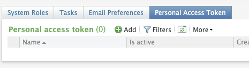
- Click on "Personal Access Token".
- Click on "Add".
- Enter the name "socialgood".
- Copy the personal token.
- Click on "Save".
Obtain the account name and token for integration use. Avoid assigning the "System Administrator" role to this account. Do not share account details with anyone other than the application.