
Registrants are not showing up in the Ticket Scanner
If you're experiencing issues with registrants not showing up in the ticket scanner, verify you are querying them by the name of the registrant and not the purchaser.
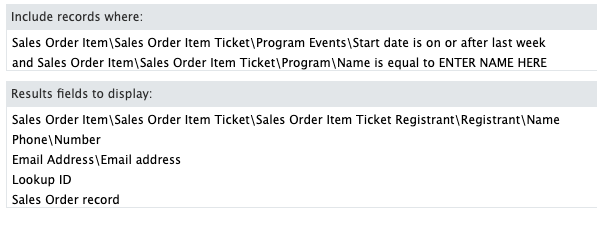
After you update your query, open the settings of the Ticket Scanner and select the “Name” to be the registrant name. “Sales Order Item\Sales Order Item Ticket\Sales Order Item Ticket Registrant\Registrant\Name”.

After these changes, the registrants are now in your Ticket Scanner.
If you continue not to find the registrant, you can manually request data from the query by following the steps below.
Manual data download:
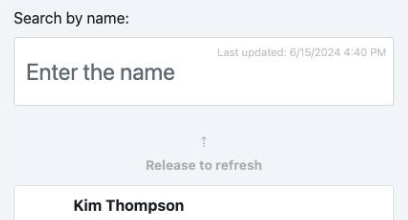
- Open application.
- Click on “Search”.
- Manually pull down the card to refresh data.
- Wait for the query to return the latest result.
Registrants are not showing up in the Ticket Scanner
66a7dc55ebb98e6cfc598ec5
66c1f27c7c359113ce1af6d5
"\nIf you're experiencing issues with registrants not showing up in the ticket scanner, verify you are querying them by the name of the registrant and not the purchaser.\n\n\n\nAfter you update your query, open the settings of the Ticket Scanner and select the “Name” to be the registrant name. “Sales Order Item\\Sales Order Item Ticket\\Sales Order Item Ticket Registrant\\Registrant\\Name”.\n\n\n\nAfter these changes, the registrants are now in your Ticket Scanner.\n\nIf you continue not to find the registrant, you can manually request data from the query by following the steps below.\n\n**Manual data download:**\n\n\n\n- Open application.\n- Click on “Search”.\n- Manually pull down the card to refresh data.\n- Wait for the query to return the latest result.\n"