
Scheduling a data download
You can schedule a data download for your Ticket Scanner at any time. The data download runs the query connected to your scanner. This process is automatically performed on your behalf when using the Ticket Scanner.
Step 1:
- Log in to your Account.
- Click on “Ticket Scanner”.
- Click on your scanner.
Step 2:
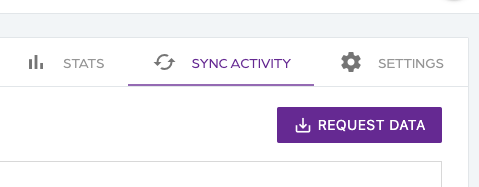
- Click on “Sync activity”.
- Click on the “Request data” button.
- A prompt appears.
- Click on the “Request data” button.
Step 3:
- Wait for a few seconds while the query runs.
- A new activity is added with the updated data.
Scheduling a data download
66a7dc55ebb98e6cfc598ec5
66a8235debb98e6cfc598f58
"\nYou can schedule a data download for your Ticket Scanner at any time. The data download runs the query connected to your scanner. This process is automatically performed on your behalf when using the Ticket Scanner.\n\n**Step 1:**\n\n- Log in to your [Account](https://app.socialgoodsoftware.com/dashboard).\n- Click on “[Ticket Scanner](https://app.socialgoodsoftware.com/scanners)”.\n- Click on your scanner.\n\n**Step 2:**\n\n\n\n- Click on “Sync activity”.\n- Click on the “Request data” button.\n- A prompt appears.\n- Click on the “Request data” button.\n\n**Step 3:**\n\n- Wait for a few seconds while the query runs.\n- A new activity is added with the updated data.\n\n"