History
The History section lets you review scanned tickets and visitor information quickly and easily.
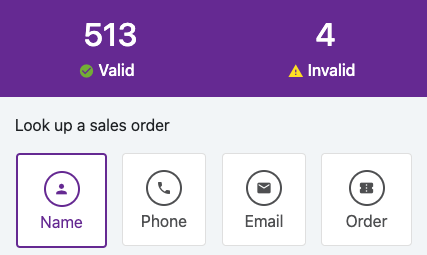
Here's how you can look up past scans.
Name:
Look up tickets by full name, including first and last names. This is a fuzzy search, so if you type in the beginning or end of a name, the results will be filtered based on your input. This is the name entered at the time of purchase.
Phone:
Look up tickets by phone number. This is a fuzzy search, so if you type in the beginning or end of a phone number, the results will be filtered based on your input. This is the phone number entered at the time of purchase.
Email:
Look up tickets by email address. This is a fuzzy search, so if you type in the beginning or end of an email address, the results will be filtered based on your input. This is the email address entered at the time of purchase.
Order:
Look up visitors by order number. This is a fuzzy search, so if you type in the beginning or end of an order number, the results will be filtered based on your input. This is the order number provided at the time of purchase.
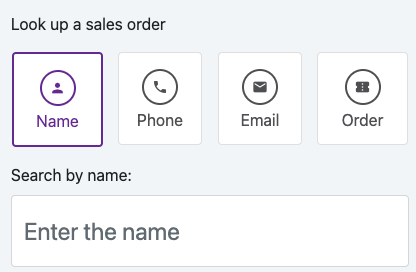
To search for a specific ticket, tap on your search selection and type in the value. As you type, the list will be filtered based on your search criteria. Once you have located your ticket, tap on the ticket to view the additional details.
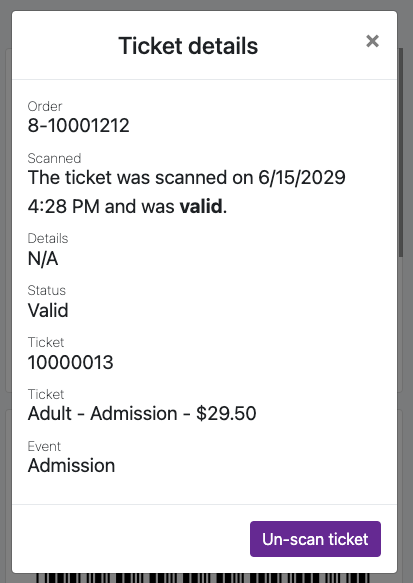
If this was a valid ticket, you can see the details for the order and un-scan a ticket to rescan the same ticket. To view the details, click on the tab on the card to open the dialog with all the details.
History
66a7dc55ebb98e6cfc598ec5
66a8235cebb98e6cfc598f57
"\nThe History section lets you review scanned tickets and visitor information quickly and easily.\n\n\n\nHere's how you can look up past scans.\n\n**Name:**\n\nLook up tickets by full name, including first and last names. This is a fuzzy search, so if you type in the beginning or end of a name, the results will be filtered based on your input. This is the name entered at the time of purchase.\n\n**Phone:**\n\nLook up tickets by phone number. This is a fuzzy search, so if you type in the beginning or end of a phone number, the results will be filtered based on your input. This is the phone number entered at the time of purchase.\n\n**Email:**\n\nLook up tickets by email address. This is a fuzzy search, so if you type in the beginning or end of an email address, the results will be filtered based on your input. This is the email address entered at the time of purchase.\n\n**Order:**\n\nLook up visitors by order number. This is a fuzzy search, so if you type in the beginning or end of an order number, the results will be filtered based on your input. This is the order number provided at the time of purchase.\n\n\n\nTo search for a specific ticket, tap on your search selection and type in the value. As you type, the list will be filtered based on your search criteria. Once you have located your ticket, tap on the ticket to view the additional details.\n\n\n\nIf this was a valid ticket, you can see the details for the order and un-scan a ticket to rescan the same ticket. To view the details, click on the tab on the card to open the dialog with all the details.\n\n"
