
Log in to the Ticket Scanner
To log in to the Scanner, ensure the scanner is configured, and the application is installed on the device with an active internet connection.
Step 1:
- Open the application on your device.
- Obtain your “app id” from your settings.
Step 2:
- Enter the “app id” to log in to the application.
- You can either manually enter your “app id” or use the scanner to scan in the value.
Step 3:
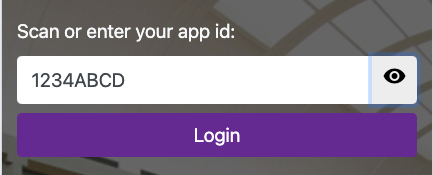
- Click on the “eye” icon to verify you entered it correctly.
- Click on the “Login” button to log in to the application.
Log in to the Ticket Scanner
66a7dc55ebb98e6cfc598ec5
66a82357ebb98e6cfc598f55
"\nTo log in to the Scanner, ensure the scanner is configured, and the application is installed on the device with an active internet connection.\n\n**Step 1:**\n\n- Open the application on your device.\n- Obtain your “app id” from your settings.\n\n**Step 2:**\n\n- Enter the “app id” to log in to the application.\n- You can either manually enter your “app id” or use the scanner to scan in the value.\n\n**Step 3:**\n\n\n\n- Click on the “eye” icon to verify you entered it correctly.\n- Click on the “Login” button to log in to the application.\n\n"