
Mapping search by fields
Your Ticket Scanner can look up guests who have forgotten their tickets by name, phone number, email address, or lookup ID. To ensure this feature works correctly, verify that your query is correctly mapped to your scanner. Only the constituents included in your query will be searchable.
If you created your query correctly, the mapping is done automatically. However, if you are using custom mapping options, such as first names or nested email addresses, map these manually.
Step 1:
- Log in to your Account.
- Click on the Ticket Scanner.
- Click on your scanner.
Step 2:
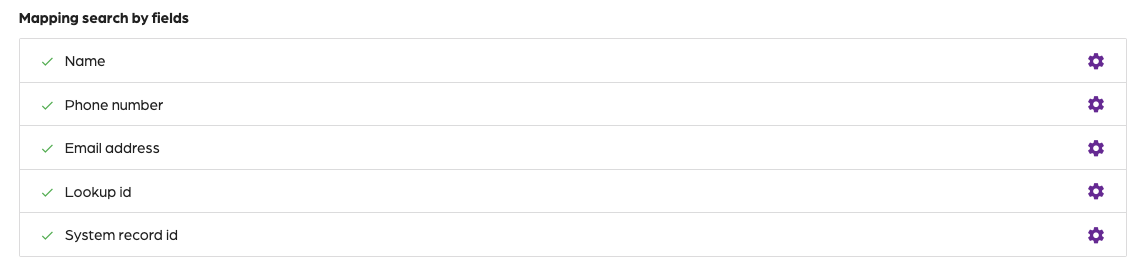
- Click on ”Settings” on the top right.
- Locate the “Mapping search by fields” section.
Step 3:
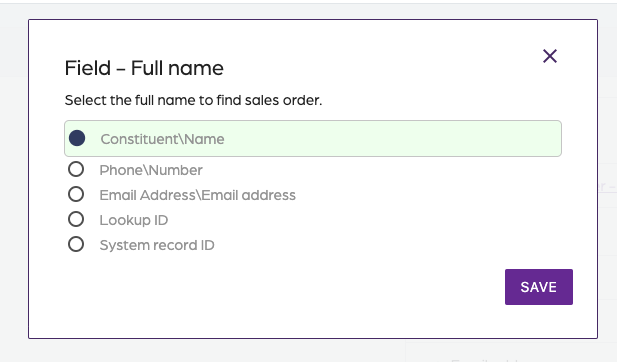
- Click on the gear for each mapping field.
- A dialog box will appear.
- Select the output field from your query.
- The suggested output field is highlighted in green.
- Click on “Save”.
- Repeat this process for each field.
Mapping search by fields
66a7dc55ebb98e6cfc598ec5
66a82355ebb98e6cfc598f53
"\nYour Ticket Scanner can look up guests who have forgotten their tickets by name, phone number, email address, or lookup ID. To ensure this feature works correctly, verify that your query is correctly mapped to your scanner. Only the constituents included in your query will be searchable.\n\nIf you created your query correctly, the mapping is done automatically. However, if you are using custom mapping options, such as first names or nested email addresses, map these manually.\n\n**Step 1:**\n\n- Log in to your [Account](https://app.socialgoodsoftware.com/dashboard).\n- Click on the [Ticket Scanner](https://app.socialgoodsoftware.com/scanners).\n- Click on your scanner.\n\n**Step 2:**\n\n\n\n- Click on ”Settings” on the top right.\n- Locate the “Mapping search by fields” section.\n\n**Step 3:**\n\n\n\n- Click on the gear for each mapping field.\n- A dialog box will appear.\n- Select the output field from your query.\n- The suggested output field is highlighted in green.\n- Click on “Save”.\n- Repeat this process for each field.\n\n"