
Removing OData links
You can remove an OData link from your Ticket Scanner if it is no longer needed.
Step 1:
- Log in to your Account.
- Click on “Ticket Scanner”.
- Click on your scanner.
Step 2:
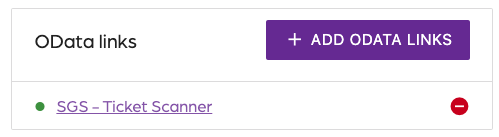
- Click on ”Settings” on the top right.
- Locate the “OData links” section.
Step 3:
- Click on the red circle icon.
- Receive a prompt to confirm.
- Click on “Remove OData link”.
Removing OData links
66a7dc55ebb98e6cfc598ec5
66a8235485cc923c86cb1eab
"\nYou can remove an OData link from your Ticket Scanner if it is no longer needed.\n\n**Step 1:**\n\n- Log in to your [Account](https://app.socialgoodsoftware.com/dashboard).\n- Click on “[Ticket Scanner](https://app.socialgoodsoftware.com/scanners)”.\n- Click on your scanner.\n\n**Step 2:**\n\n\n\n- Click on ”Settings” on the top right.\n- Locate the “OData links” section.\n\n**Step 3:**\n\n- Click on the red circle icon.\n- Receive a prompt to confirm.\n- Click on “Remove OData link”.\n\n"