
Adding OData links
The scanner supports any number of OData links. If your organization has more than one OData link, follow the steps to add additional links to your Ticket Scanner.
Step 1:
- Log in to your Account.
- Click on “Ticket Scanner”.
- Click on your ticket scanner.
Step 2:
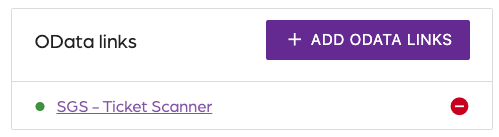
- Click on ”Settings” on the top right.
- Locate the “OData links” section.
Step 3:
- Click on “Add OData links”.
- Copy and paste the OData link from Altru.
- Click on “Next”.
- Click on “Add link”.
Adding OData links
66a7dc55ebb98e6cfc598ec5
66a82354082392452a075204
"\nThe scanner supports any number of OData links. If your organization has more than one OData link, follow the steps to add additional links to your Ticket Scanner.\n\n**Step 1:**\n\n- Log in to your [Account](https://app.socialgoodsoftware.com/dashboard).\n- Click on “[Ticket Scanner](https://app.socialgoodsoftware.com/scanners)”.\n- Click on your ticket scanner.\n\n**Step 2:**\n\n\n\n- Click on ”Settings” on the top right.\n- Locate the “OData links” section.\n\n**Step 3:**\n\n- Click on “Add OData links”.\n- Copy and paste the OData link from Altru.\n- Click on “Next”.\n- Click on “Add link”.\n\nT> Keep in mind, each query you add needs to have the same output fields.\n\n"