
Enforce Altru scanning configuration
You can enforce your Altru ticket scanning rules per scanner rather than applying them system-wide. For instance, you can set individual scanners to accept tickets 90 minutes before a scheduled event begins and stop accepting tickets 30 minutes after the event starts.
Step 1:
- Log in to your Account.
- Click on “Ticket Scanner”.
- Click on your scanner.
Step 2:

- Click on “Settings” on the top right.
- Locate the “Enforce Altru scanning configuration” option.
- Enable the option.
- Options for the rules will appear.
Step 3:
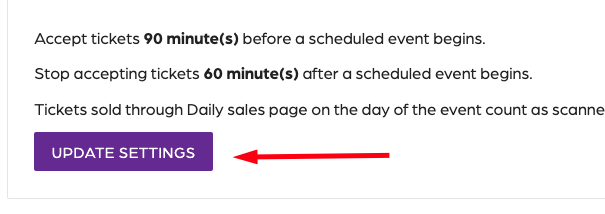
- Locate the settings and click on “Update settings”.
- A prompt will appear with the options that you can adjust.
- Enter the number of minutes as an integer.
- Click on “Save settings”.
Enforce Altru scanning configuration
66a7dc55ebb98e6cfc598ec5
66a82351082392452a075202
"\nYou can enforce your Altru ticket scanning rules per scanner rather than applying them system-wide. For instance, you can set individual scanners to accept tickets 90 minutes before a scheduled event begins and stop accepting tickets 30 minutes after the event starts.\n\n**Step 1:**\n\n- Log in to your [Account](https://app.socialgoodsoftware.com/dashboard).\n- Click on “[Ticket Scanner](https://app.socialgoodsoftware.com/scanners)”.\n- Click on your scanner.\n\n**Step 2:**\n\n\n\n- Click on “Settings” on the top right.\n- Locate the “Enforce Altru scanning configuration” option.\n- Enable the option.\n- Options for the rules will appear.\n\n**Step 3:**\n\n\n\n- Locate the settings and click on “Update settings”.\n- A prompt will appear with the options that you can adjust.\n- Enter the number of minutes as an integer.\n- Click on “Save settings”.\n\n"