
Import the Altru calendar into Outlook
Step 1: Outlook calendar
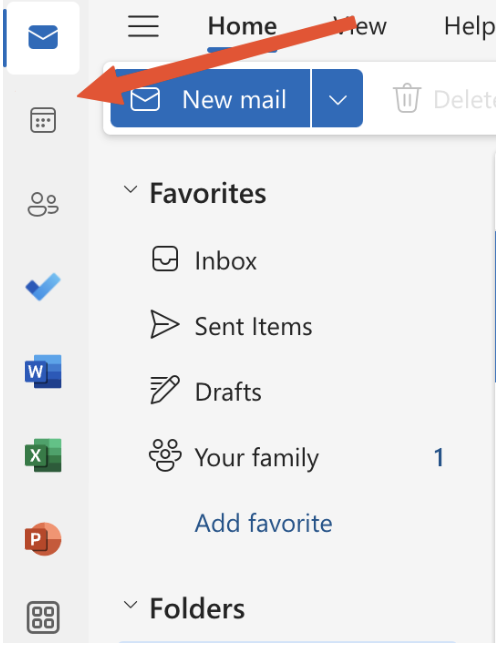
- In Microsoft Outlook, on the left sidebar, click on the calendar icon.
- Click on “Add calendar”.
- On the “Add calendar” pop-up, select "Subscribe from web”.
Step 2: Paste URL
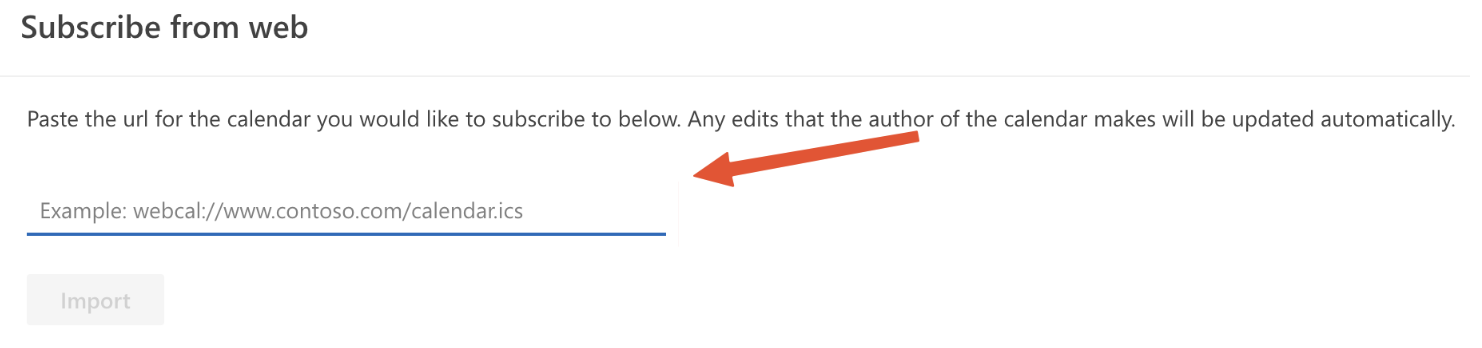
- Paste your copied iCal Feed URL in the field.
- Customize the name, colors, or icon.
- Click on “Import” to save changes.
Once you see your events in Outlook, they are automatically synced to the Calendar Builder. It can take around 25 minutes for the changes to take effect.
Import the Altru calendar into Outlook
67452223faffbb5b3516494b
698c9a9246163daea3355735
"\n**Step 1: Outlook calendar**\n\n\n\n- In Microsoft Outlook, on the left sidebar, click on the calendar icon.\n- Click on “Add calendar”.\n- On the “Add calendar” pop-up, select \"Subscribe from web”.\n\n**Step 2: Paste URL**\n\n\n\n- Paste your copied iCal Feed URL in the field.\n- Customize the name, colors, or icon.\n- Click on “Import” to save changes.\n\nOnce you see your events in Outlook, they are automatically synced to the Calendar Builder. It can take around 25 minutes for the changes to take effect.\n\n"