
Create a package event for multiple days in Altru
Step 1: Add a scheduled program
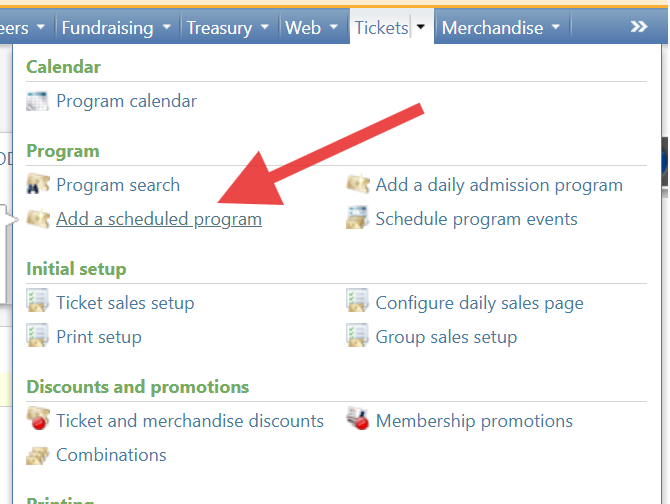
- Log in to Altru.
- Click “Tickets” then “Add a scheduled Program”.
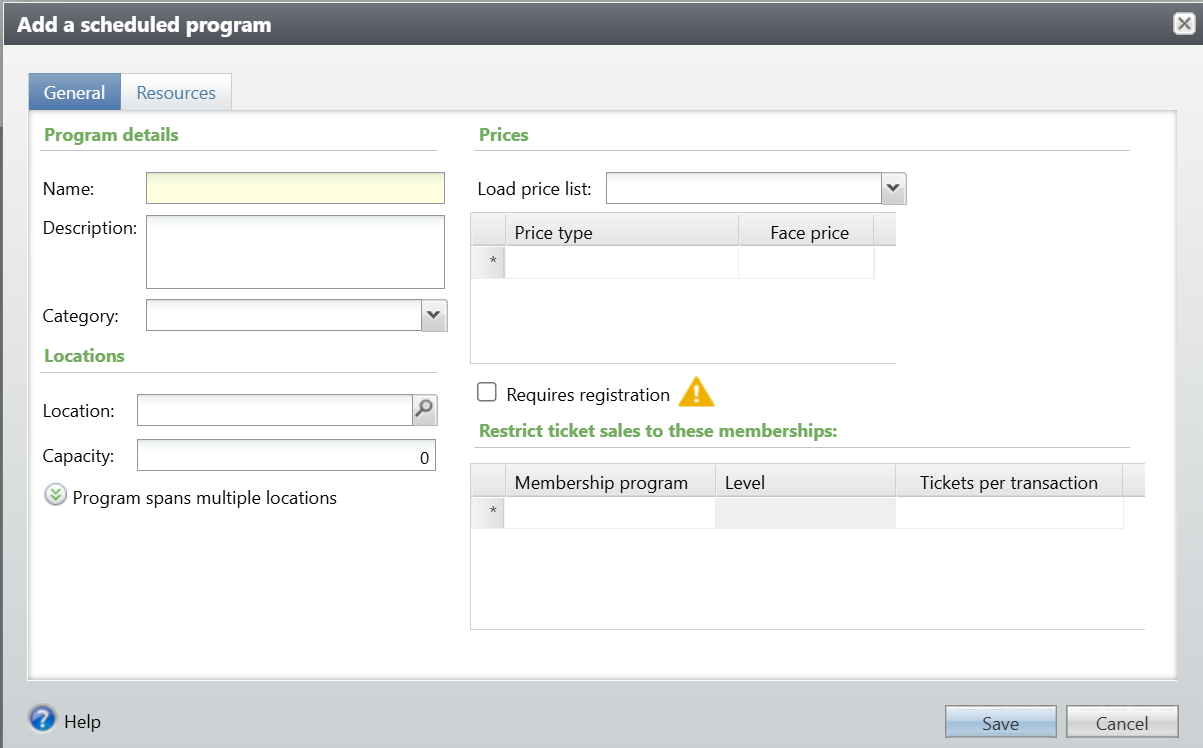
- Enter a name and price type.
- Add description, location, category, and membership program, which can be entered optionally if necessary.
- Mark the “Requires registration” checkbox. Only pre-registered programs can be used to create packages.
- Click “Save”.
Step 2: Add event list
- Click the “Event List” tab, then click “Add”.
- Set a recurrence to be something other than a single date.
- Enter applicable dates.
- Enter a time.
- Mark the checkbox to “Create a package with these events”.
Step 3: Add package details
- Click the “Package Details” tab.
- Here you can adjust the package description, capacity, member restrictions, and price for the overall package.
- Mark the checkbox to “Allow patrons to register for individual events” if you would like events to be sold individually from within the package.
- Click “Save”.
Create a package event for multiple days in Altru
67452223faffbb5b3516494b
698c9a91240bcd4e4cbeae31
"\n**Step 1: Add a scheduled program**\n\n\n\n- Log in to Altru.\n- Click “Tickets” then “Add a scheduled Program”.\n- Enter a name and price type.\n- Add description, location, category, and membership program, which can be entered optionally if necessary.\n- Mark the “Requires registration” checkbox. Only pre-registered programs can be used to create packages.\n- Click “Save”.\n\n\n\n**Step 2: Add event list**\n\n- Click the “Event List” tab, then click “Add”.\n- Set a recurrence to be something other than a single date.\n- Enter applicable dates.\n- Enter a time.\n- Mark the checkbox to “Create a package with these events”.\n\n**Step 3: Add package details**\n\n- Click the “Package Details” tab.\n- Here you can adjust the package description, capacity, member restrictions, and price for the overall package.\n- Mark the checkbox to “Allow patrons to register for individual events” if you would like events to be sold individually from within the package.\n- Click “Save”.\n\n"