
Setting up a list view for the calendar on a mobile device
Step 1: Open Calendar Builder
- Click on “Calendar Builder”.
- Select your calendar.
Step 2: Choose a view
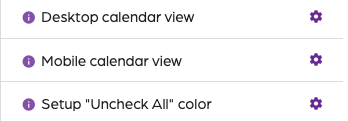
- Click on “Settings”.
- Click on the gear next to the “Mobile Calendar View”.
- Select a calendar view.
- Click on “Save”.
Step 3: Save
- Click on the “Preview” tab to view changes.
- Click on “Save settings”.
Setting up a list view for the calendar on a mobile device
67452223faffbb5b3516494b
698c9a9146163daea3355734
"\n**Step 1: Open Calendar Builder**\n\n- Click on “Calendar Builder”.\n- Select your calendar.\n\n**Step 2: Choose a view**\n\n\n\n- Click on “Settings”.\n- Click on the gear next to the “Mobile Calendar View”.\n- Select a calendar view.\n- Click on “Save”.\n\n**Step 3: Save**\n\n- Click on the “Preview” tab to view changes.\n- Click on “Save settings”.\n\n"