
Showing availability on Calendar
You can display the number of remaining tickets directly on the calendar by using an inline variable. This allows visitors to see availability in real time.
To show the number of remaining tickets, add the %availability% variable to the event title when mapping reserved events.
Example:
General Admission – %availability% tickets remaining
This will replace the variable with the actual number of available tickets for each time slot or event.
To add this to the calendar, follow the steps below.
Step 1:
- Open the selected calendar
- Click on “Settings”
- In the event name, click on the "pencil" icon
Step 2:
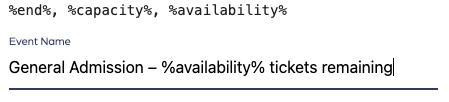
- Add the merge field to the calendar
- Click on “Save”
Showing availability on Calendar
67452223faffbb5b3516494b
683c352106b6006fd9469246
"\nYou can display the number of remaining tickets directly on the calendar by using an inline variable. This allows visitors to see availability in real time.\n\nTo show the number of remaining tickets, add the %availability% variable to the event title when mapping reserved events.\n\nExample:\n\nGeneral Admission – %availability% tickets remaining\n\nThis will replace the variable with the actual number of available tickets for each time slot or event.\n\nTo add this to the calendar, follow the steps below.\n\nStep 1:\n\n- Open the selected calendar\n- Click on “Settings”\n- In the event name, click on the \"pencil\" icon\n\nStep 2:\n\n\n\n- Add the merge field to the calendar\n- Click on “Save”\n"