
Modify membership cards
Your digital membership card requires several assets across multiple devices. For the digital membership card in the web view, a front of card and back of card image is required. For the members digital wallet, both Apple and Android devices, a logo and a hero image is required.
Step 1: Select a design
- Click on “Development”.
- Click on “Membership Card Designer”.
- Select your design.
Step 2: Upload files
- Click on “Settings”.
- Select “Files” from the dropdown.
- Upload each file - View templates.
- Click “Save Design”.
Step 3: Verify the following assets have been uploaded
- Repeat this process for each of the following.
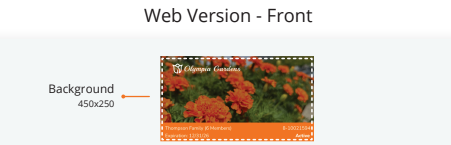
- Web Front- 450x250
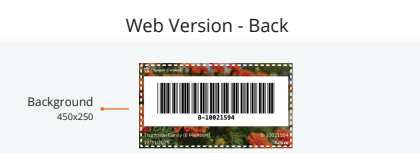
- Web Back - 450x250
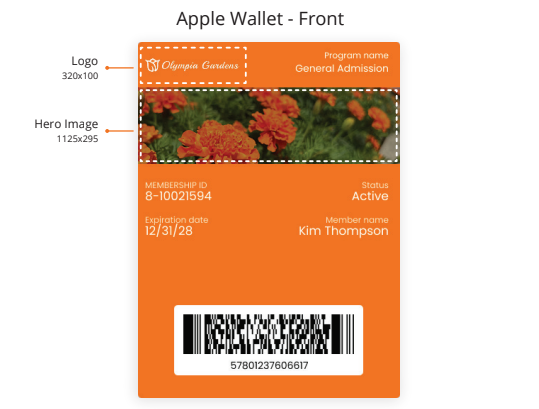
- Apple Wallet Logo - 320x100
- Apple Wallet Hero Image - 1125x295
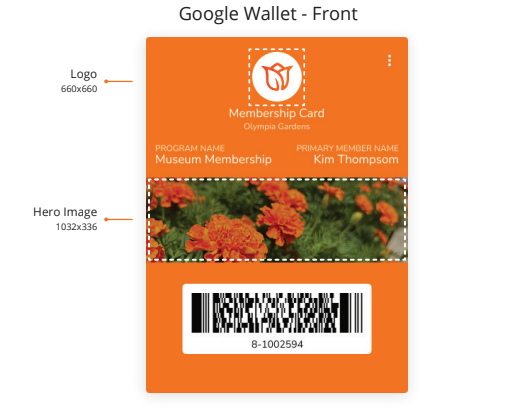
- Google Pay Logo - 660x660
- Google Pay Hero Image - 1032x336
Step 4: Verify your images look correct
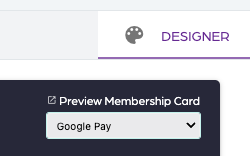
- Click on “Designer”
- Select the dropdown from the preview
- Click through each of the options to preview the images
- Web Front
- Web Back
- Apple Wallet
- Apple Wallet - Back
- Google Pay
- Google Pay - Bottom
If incorrect file sizes are used, then your images get cropped and resized automatically. Make sure you follow our recommendations for photo sizes.
Here are some samples:
Modify membership cards
674522ea00e65011afed6165
68361458b49b294feace00a1
"\nYour digital membership card requires several assets across multiple devices. For the digital membership card in the web view, a front of card and back of card image is required. For the members digital wallet, both Apple and Android devices, a logo and a hero image is required.\n\n**Step 1: Select a design**\n\n- Click on “Development”.\n- Click on “[Membership Card Designe](https://app.socialgoodsoftware.com/development)r”.\n- Select your design.\n\n**Step 2: Upload files**\n\n- Click on “Settings”.\n- Select “Files” from the dropdown.\n- Upload each file - [View templates](https://help.socialgoodsoftware.com/article/3638-digital-card-image-templates).\n- Click “Save Design”.\n\n**Step 3: Verify the following assets have been uploaded**\n\n- Repeat this process for each of the following.\n- Web Front- 450x250\n- Web Back - 450x250\n- Apple Wallet Logo - 320x100\n- Apple Wallet Hero Image - 1125x295\n- Google Pay Logo - 660x660\n- Google Pay Hero Image - 1032x336\n\n**Step 4: Verify your images look correct**\n\n\n\n- Click on “Designer”\n- Select the dropdown from the preview\n- Click through each of the options to preview the images\n- Web Front\n- Web Back\n- Apple Wallet\n- Apple Wallet - Back\n- Google Pay\n- Google Pay - Bottom\n\nIf incorrect file sizes are used, then your images get cropped and resized automatically. Make sure you follow our recommendations for photo sizes.\n\nW> If you skip this step of uploading your own files, then default social good software images will be used.\n\n**Here are some samples:**\n\n\n\n\n\n\n\n\n"