
5 - Verify proxy user has permissions
Valid permissions are required for the proxy user to have, to verify you need to have access to users in Altru.
Step 1: Verify that roles are added
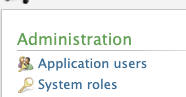
- Log in to Altru
- Click on “Administration”
- Click on “Application users.”
Step 2: Identify the user with the roles
- Search for “sgs-account.”
- Click on the account
Step 3: Verify the roles and permissions
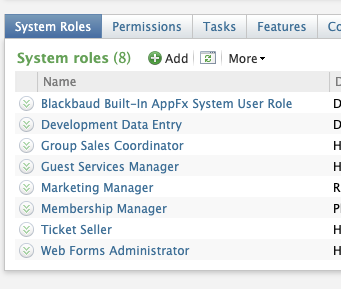
- Verify “Group Sales Coordinator” is added
- Verify that “Blackbaud Built-In AppFx System User Role” is added
- If roles are missing, add them to the user
5 - Verify proxy user has permissions
674522bec70af9799c5c75c8
682f60e99cb4a324e4db2e47
"\nValid permissions are required for the proxy user to have, to verify you need to have access to users in Altru.\n\n**Step 1: Verify that roles are added**\n\n\n\n- Log in[ to Altru](https://app.socialgoodsoftware.com/altru)\n- Click on “Administration”\n- Click on “Application users.”\n\n**Step 2: Identify the user with the roles**\n\n- Search for “sgs-account.”\n- Click on the account\n\n**Step 3: Verify the roles and permissions**\n\n\n\n- Verify “Group Sales Coordinator” is added\n- Verify that “Blackbaud Built-In AppFx System User Role” is added\n- If roles are missing, add them to the user\n\n"