
Create a payment request link for group sales order
Step 1: Create group sales reservation
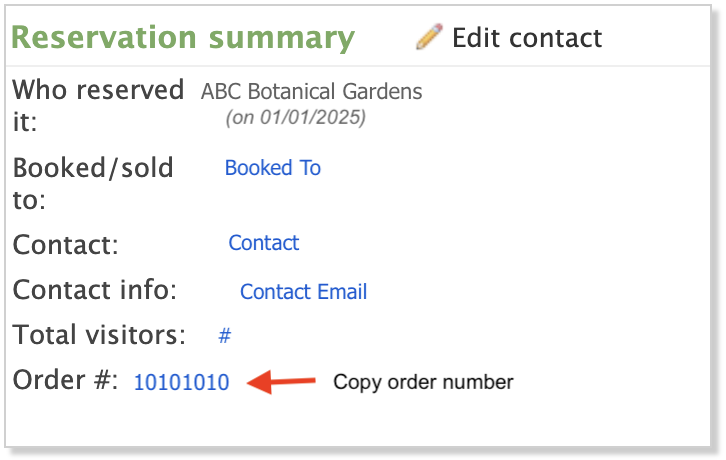
- In Altru, set up a group sales reservation in Altru.
- Copy the group sales order number.
Step 2: Login to Link2Pay
- Login to Social Good Software.
- Click on “Development”.
- Click on “Link2Pay”.
- Click on the “Links” tab.
Step 3: Create new payment request link
- Click “Add Link”
- Enter name and click “Next”.
- Click “Group Sales” for the type of link and click “Next”.
- Enter or paste in the group sales order number and click “Search”.
- Click on the order number found.
- Review order information and click “Select Group Sale”.
- Confirm the contact name, email address, and amount are accurate.
- Click “Next”.
- Review payment link details and click “Add Link”.
Step 4: Send payment request email
- Locate the specific payment request you want to send.
- Click on the “…” and then click “Send request”.
- Confirm the details and click “Send request”.
After you have sent a payment request email, the date and time the email was sent will appear under the “Request date” column heading.
Create a payment request link for group sales order
674522bec70af9799c5c75c8
6746296fc70af9799c5c7839
"\n**Step 1: Create group sales reservation**\n\n\n\n- In Altru, set up a group sales reservation in Altru.\n- Copy the group sales order number.\n\n**Step 2: Login to Link2Pay**\n\n- Login to Social Good Software.\n- Click on “Development”.\n- Click on “Link2Pay”.\n- Click on the “Links” tab.\n\n**Step 3: Create new payment request link**\n\n- Click “Add Link”\n- Enter name and click “Next”.\n- Click “Group Sales” for the type of link and click “Next”.\n- Enter or paste in the group sales order number and click “Search”.\n- Click on the order number found.\n- Review order information and click “Select Group Sale”.\n- Confirm the contact name, email address, and amount are accurate.\n- Click “Next”.\n- Review payment link details and click “Add Link”.\n\n**Step 4: Send payment request email**\n\n- Locate the specific payment request you want to send.\n- Click on the “…” and then click “Send request”.\n- Confirm the details and click “Send request”.\n\nAfter you have sent a payment request email, the date and time the email was sent will appear under the “Request date” column heading.\n\n"