
Import iCal feed into Google Calendar
Create a calendar and then follow these steps.
Step 1: Copy iCal Feed
- Click on “Calendar Builder”.
- Click on “Share”.
- Click on “Copy link” under iCal Feed.
Step 2: Import URL
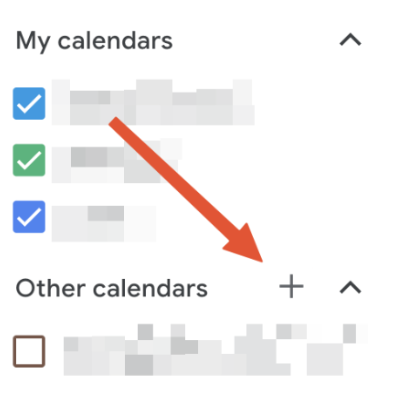
- In Google Calendar, click on the plus button in the "Other calendars" section placed on the sidebar.
- Click on “Import”.
- Paste the URL.
- Click on “Add Calendar”.
Step 3: Edit
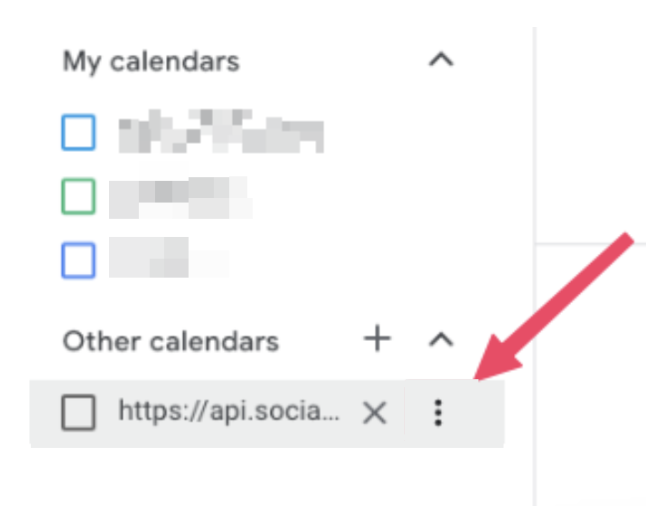
- Click on the 3 dots next to the new calendar.
- Click on “Settings”.
- Change the name of the calendar in the name field.
Import iCal feed into Google Calendar
67452223faffbb5b3516494b
6745d5b7faffbb5b35164ab0
"\nCreate a calendar and then follow these steps.\n\n**Step 1: Copy iCal Feed**\n\n- Click on “Calendar Builder”.\n- Click on “Share”.\n- Click on “Copy link” under iCal Feed.\n\n**Step 2: Import URL**\n\n\n\n- In Google Calendar, click on the plus button in the \"Other calendars\" section placed on the sidebar.\n- Click on “Import”.\n- Paste the URL.\n- Click on “Add Calendar”.\n\n**Step 3: Edit**\n\n\n\n- Click on the 3 dots next to the new calendar.\n- Click on “Settings”.\n- Change the name of the calendar in the name field.\n\n"