
Exclude selected events from a calendar
Step 1: Open your calendar
- Click on “Calendar Builder”.
- Select your calendar.
Step 2: Settings
- Click on “Settings”.
- Click on the query.
- Click on “Edit Definition”.
Step 3: Add restriction dates to the query
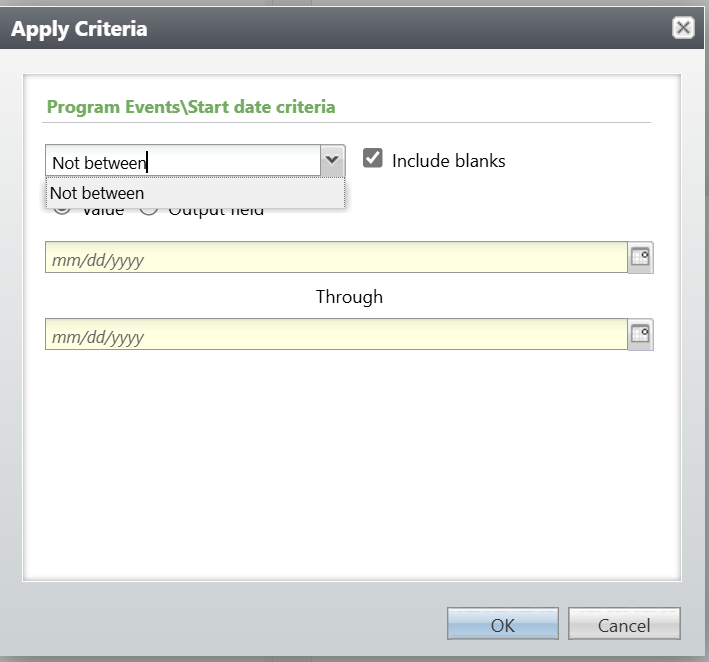
- Add restrictions to the query as needed.
- Add "Start Date" and set conditions to "Not Between”, “Not”, "Is equal to”, etc.
- Enter the dates to exclude/include (e.g., December 31st and January 2nd).
- Click "OK," then "Save and Close".
- The restriction should be added to the display.
Step 4: Sync data
- Click on “Sync Activity”.
- Click on “Request data”.
Step 5: Save
- Click on “Preview” to view changes.
- Click on “Save settings”.
Exclude selected events from a calendar
67452223faffbb5b3516494b
6745d5b600e65011afed62c8
"\n**Step 1: Open your calendar**\n\n- Click on “Calendar Builder”.\n- Select your calendar.\n\n**Step 2: Settings**\n\n- Click on “Settings”.\n- Click on the query.\n- Click on “Edit Definition”.\n\n**Step 3: Add restriction dates to the query**\n\n\n\n- Add restrictions to the query as needed.\n- Add \"Start Date\" and set conditions to \"Not Between”, “Not”, \"Is equal to”, etc.\n- Enter the dates to exclude/include (e.g., December 31st and January 2nd).\n- Click \"OK,\" then \"Save and Close\".\n- The restriction should be added to the display.\n\n**Step 4: Sync data**\n\n- Click on “Sync Activity”.\n- Click on “Request data”.\n\n**Step 5: Save**\n\n- Click on “Preview” to view changes.\n- Click on “Save settings”.\n\n"