
Setting up calendar days
Step 1: Open Calendar Builder
- Click on "Calendar Builder".
- Select your calendar.
Step 2: Access settings
- Click on "Settings".
Step 3: Set up calendar days
- Scroll to the bottom of the settings.
- Click the gear icon for “Setup Calendar Days”.
Step 4: Enable or disable days
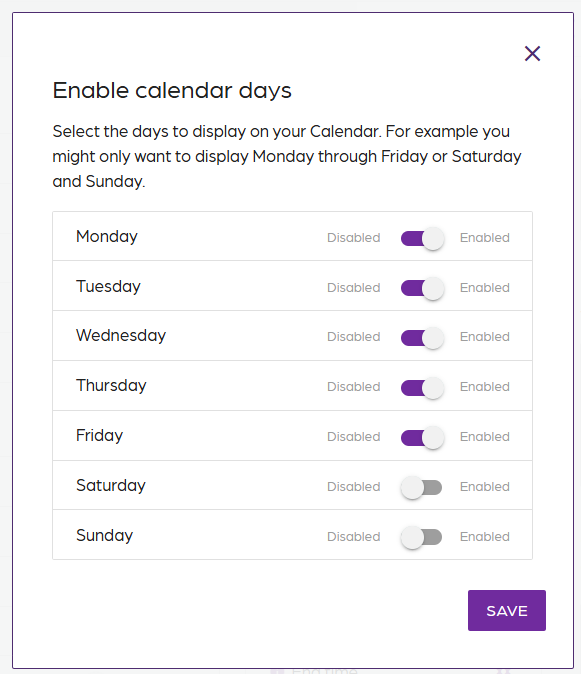
- Toggle off the days to disable.
- Select specific days to toggle on for a personalized view.
- Click on “Save”.
- Click on the "Preview" tab to see the changes.
Setting up calendar days
67452223faffbb5b3516494b
6745d5b5faffbb5b35164aad
"\n**Step 1: Open Calendar Builder**\n\n- Click on \"Calendar Builder\".\n- Select your calendar.\n\n**Step 2: Access settings**\n\n- Click on \"Settings\".\n\n**Step 3: Set up calendar days**\n\n- Scroll to the bottom of the settings.\n- Click the gear icon for “Setup Calendar Days”.\n\n**Step 4: Enable or disable days**\n\n\n\n- Toggle off the days to disable.\n- Select specific days to toggle on for a personalized view.\n- Click on “Save”.\n- Click on the \"Preview\" tab to see the changes.\n\n"