
Display availability in a calendar
Step 1: Select your calendar
- Log in to the SGS application.
- Click on “Calendar Builder”.
- Select your calendar.
Step 2: Settings
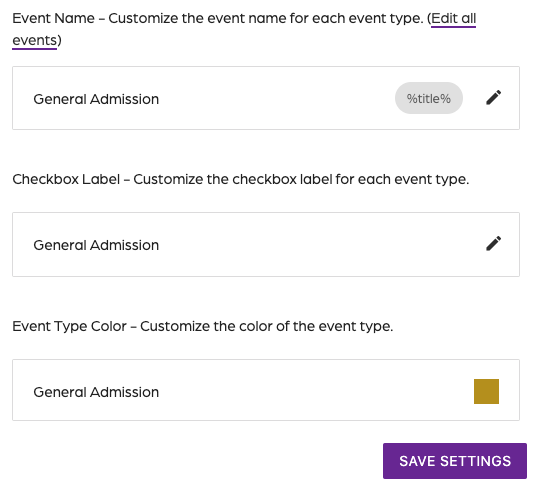
- Click on the “Settings” tab.
- Locate the “Event Name” section.
- Click on the "Edit all events" link.
Step 3: Edit event name
- Click on “Edit all events.”
- Enter the name of the event.
- Click on “Save”.
Step 4: Add availability
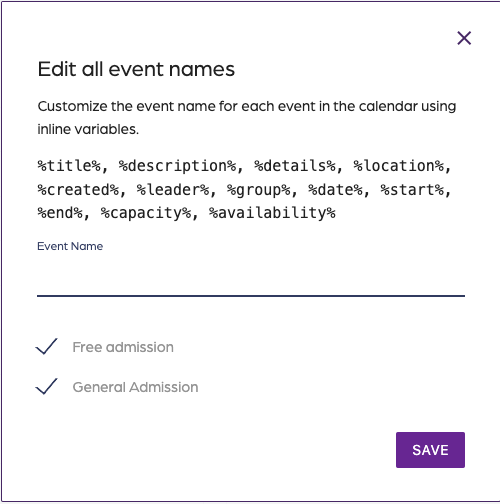
- Add the %capacity% variable to the event name.
- Select more variables from the list provided, or use the format to create your own.
- Click on “Save”.
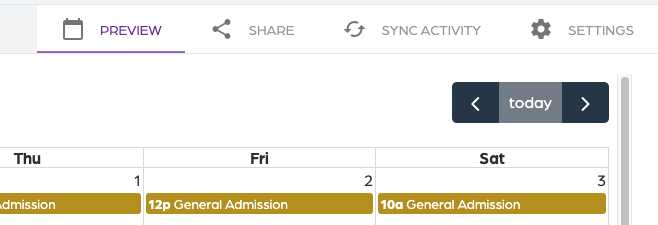
- Click on the “Preview” tab to see the availability for an event.
Display availability in a calendar
67452223faffbb5b3516494b
6745d5b4faffbb5b35164aac
"\n**Step 1: Select your calendar**\n\n- Log in to the SGS application.\n- Click on “Calendar Builder”.\n- Select your calendar.\n\n**Step 2: Settings**\n\n\n\n- Click on the “Settings” tab.\n- Locate the “Event Name” section.\n- Click on the \"Edit all events\" link.\n\n**Step 3: Edit event name**\n\n\n\n- Click on “Edit all events.”\n- Enter the name of the event.\n- Click on “Save”.\n\n**Step 4: Add availability**\n\n\n\n- Add the %capacity% variable to the event name.\n- Select more variables from the list provided, or use the format to create your own.\n- Click on “Save”.\n- Click on the “Preview” tab to see the availability for an event.\n\n"