
Adding a Calendar to WordPress
Step 1: Log in to WordPress
- Begin at the administrator section of your WordPress site.
Step 2: Create a New Page

- Click on "Pages".
- Click on "Add New Page".
- Name the page (e.g., "Time Ticketed Calendar").
Step 3: Add Custom HTML
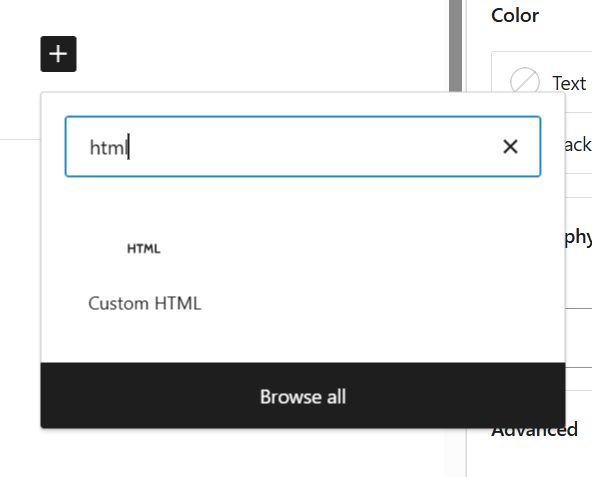
- Click on the "+" icon to add a new block.
- Click on "Custom HTML”.
Step 4: Get embed code from Social Good Software
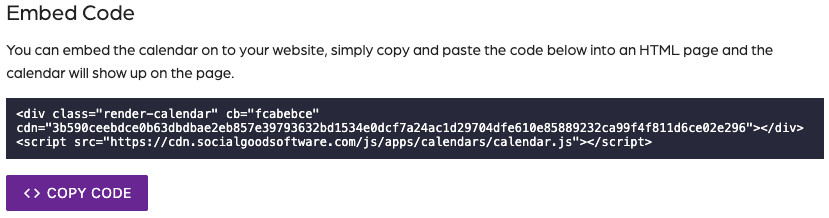
- Click on "Calendar Builder".
- Select the calendar you want to embed.
- Click on the "Share" tab.
- Copy the embed code.
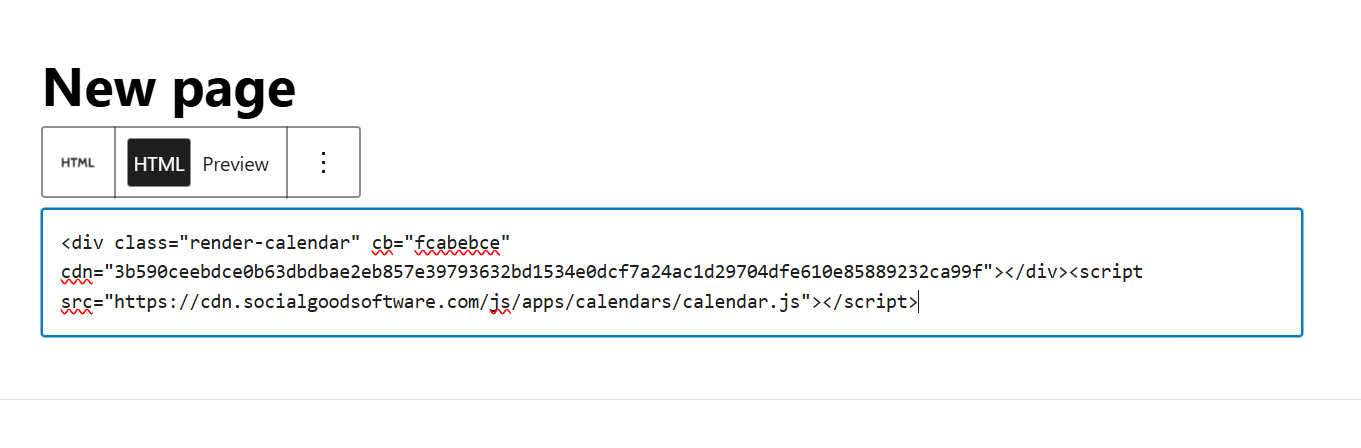
- Paste the embed code on WordPress.
Step 5: Publish page:

- Click on "Publish" to make the page live.
- Click on "View Page" to see the embedded calendar.
Adding a Calendar to WordPress
67452223faffbb5b3516494b
6745d5b41f09b9036063e059
"\n[Tutorial video](https://youtu.be/qbPpwvEqvCU)\n\n**Step 1: Log in to WordPress**\n\n- Begin at the administrator section of your WordPress site.\n\n**Step 2: Create a New Page**\n\n\n\n- Click on \"Pages\".\n- Click on \"Add New Page\".\n- Name the page (e.g., \"Time Ticketed Calendar\").\n\n**Step 3: Add Custom HTML**\n\n\n\n- Click on the \"+\" icon to add a new block.\n- Click on \"Custom HTML”.\n\n**Step 4: Get embed code from Social Good Software**\n\n\n\n- Click on \"Calendar Builder\".\n- Select the calendar you want to embed.\n- Click on the \"Share\" tab.\n- Copy the embed code.\n- Paste the embed code on WordPress.\n\n**Step 5: Publish page:**\n\n\n\n- Click on \"Publish\" to make the page live.\n- Click on \"View Page\" to see the embedded calendar.\n\n"