
3 - Link the application from the Marketplace
Step 1: Log in to your Blackbaud Account
- Log in to Blackbaud.
- Verify you log in with the “Environment Admin.”
- This is required to link the application.
Step 2: Blackbaud Marketplace
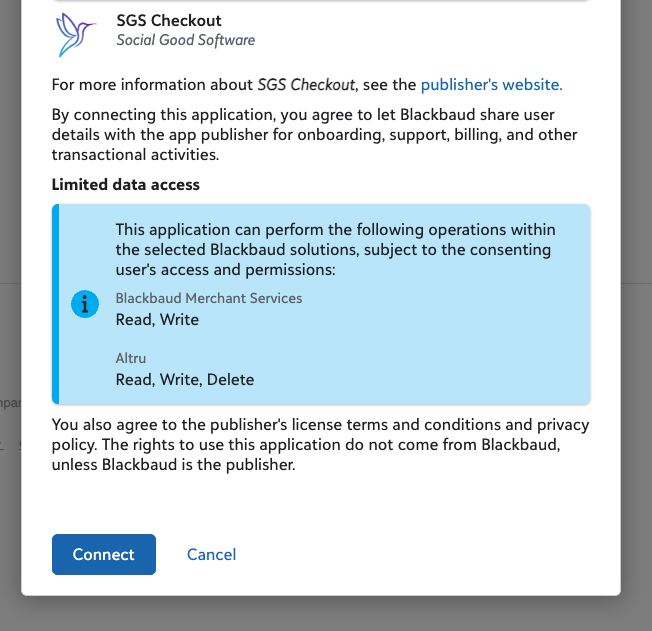
- Click on the direct link below to navigate to the application - https://app.blackbaud.com/marketplace/applications/d0e6a87d-073e-4a78-99b9-8ce614d20ca2
- Select the Blackbaud environment you wish to connect with.
- If you have multiple environments, they will be displayed in a list.
- Click on “Connect”
- Make a note of the environment you selected, as this will be needed in future steps.
Step 3: Verify connection
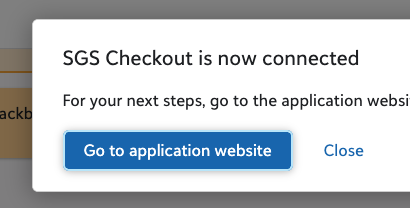
- Accept the terms and conditions and click “Connect”.
- View a success message from Blackbaud when the application is successfully connected.
3 - Link the application from the Marketplace
674522bec70af9799c5c75c8
69a6d06a12f11a8a9d61bc82
"\nW> Login with an account that has “Environment Admin” permissions to authorize the application.\n\n**Step 1: Log in to your Blackbaud Account**\n\n- Log in to [Blackbaud](https://app.blackbaud.com/).\n- Verify you log in with the “Environment Admin.”\n- This is required to link the application.\n\n**Step 2: Blackbaud Marketplace**\n\n\n\n- Click on the direct link below to navigate to the application - [https://app.blackbaud.com/marketplace/applications/d0e6a87d-073e-4a78-99b9-8ce614d20ca2](https://app.blackbaud.com/marketplace/applications/d0e6a87d-073e-4a78-99b9-8ce614d20ca2)\n- Select the Blackbaud environment you wish to connect with.\n- If you have multiple environments, they will be displayed in a list.\n- Click on “Connect”\n- Make a note of the environment you selected, as this will be needed in future steps.\n\n**Step 3: Verify connection**\n\n\n\n- Accept the terms and conditions and click “Connect”.\n- View a success message from Blackbaud when the application is successfully connected.\n\n"